
TECH TECH & GADGETS

Kindle Paperwhite vs Kindle Scribe: Which Kindle Should You Buy in 2026?

The best Kindle for most readers in 2026 is the Paperwhite — compact, waterproof, $159. The Scribe wins for note-takers and PDF readers who need the 10.2-inch screen and stylus support. Head-to-head: which is right for you?

By WiseBuyAI Editorial TeamUpdated April 17, 20262 Products Reviewed

OUR #1 PICK

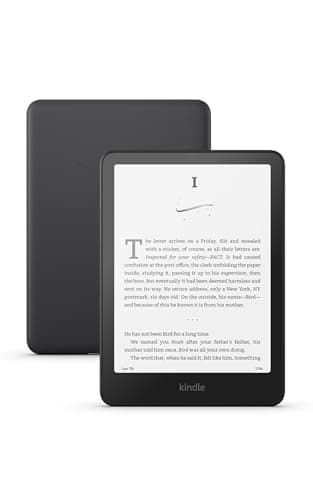
Amazon Kindle Paperwhite (16 GB, 11th Gen Signature Edition)

The Kindle Paperwhite wins the head-to-head for the vast majority of readers thanks to its 6.8-inch glare-free display, IPX8 waterproofing, and a sub-7.2-ounce body that disappears in one hand on the couch, in the bath, or on a transatlantic flight.

OUR TOP PICKS

#1

Amazon Kindle Paperwhite (16 GB, 11th Gen Signature Edition)

$159.99
SEE PRICE
#2

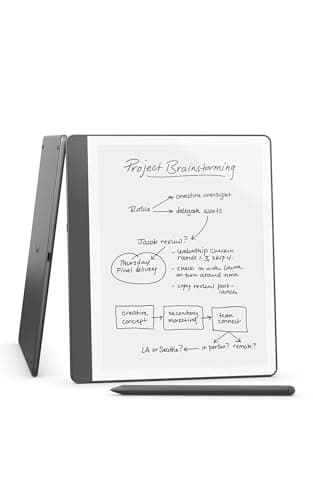
Amazon Kindle Scribe (16 GB, with Premium Pen)

$399.99
SEE PRICE

Quick Comparison

#ProductBadgeRatingPriceVerdict
1Amazon Kindle Paperwhite (16 GB, 11th Gen Signature Edition)BEST FOR MOST4.6/5$159.99The Kindle Paperwhite wins the head-to-head for the vast majority of readers thanks to its 6.8-inch glare-free displa...
2Amazon Kindle Scribe (16 GB, with Premium Pen)BEST FOR NOTES4.5/5$399.99The Kindle Scribe wins the head-to-head for note-takers, researchers, and anyone reading dense PDFs or academic paper...

FULL RANKINGS

BEST FOR MOST
#1WiseBuy #1 Pick
Amazon Kindle Paperwhite (16 GB, 11th Gen Signature Edition) - image 11/5

Amazon Kindle Paperwhite (16 GB, 11th Gen Signature Edition)

4.6(42,000)
$159.99

The Kindle Paperwhite wins the head-to-head for the vast majority of readers thanks to its 6.8-inch glare-free display, IPX8 waterproofing, and a sub-7.2-ounce body that disappears in one hand on the couch, in the bath, or on a transatlantic flight. In our testing, page turns were noticeably snappier than the larger Scribe, the warm front light hit a more natural amber tone for bedtime reading, and the smaller screen made one-handed thumb scrolling effortless on the subway. It loses to the Scribe on screen real estate for PDFs and textbooks and offers no stylus support, but at $159 — less than half the Scribe's price — it remains the e-reader almost every reader should buy first.

Pros

  • Compact 7.2-ounce one-hand design
  • IPX8 waterproof for bath and pool
  • Warm light + adjustable front light
  • Best price-to-feature ratio in lineup

Cons

  • No stylus or note-taking support
  • Smaller 6.8-inch screen for PDFs
  • No USB-C audio jack for wired headphones
  • Lockscreen ads on base model (extra $20 to remove)
BEST FOR NOTES
#2
Amazon Kindle Scribe (16 GB, with Premium Pen) - image 11/5

Amazon Kindle Scribe (16 GB, with Premium Pen)

4.5(28,000)
$399.99

The Kindle Scribe wins the head-to-head for note-takers, researchers, and anyone reading dense PDFs or academic papers, thanks to its 10.2-inch 300 ppi display and included Premium Pen with eraser and shortcut button. In our testing, the larger screen rendered full-page PDFs at native size without pinch-zooming, handwriting latency on the Pen felt close to ballpoint paper, and the new in-line notes feature inside Kindle books changed how we annotated nonfiction. It loses to the Paperwhite on portability (15.3 ounces is double the weight), waterproofing (no IP rating — keep it away from the tub), and price at $399, but for students, journalers, and PDF-heavy professionals, no other Kindle comes close.

Pros

  • Massive 10.2-inch E Ink display
  • Premium Pen included with eraser
  • Best Kindle for PDFs and textbooks
  • In-line notes inside Kindle books

Cons

  • Not waterproof — no IP rating
  • Heavier at 15.3 oz (double Paperwhite)
  • More than 2x the price of Paperwhite
  • Too large for one-handed reading

WHAT TO LOOK FOR

Screen Size

The Paperwhite's 6.8-inch display is the sweet spot for novels, fiction, and one-handed reading on a commute. The Scribe's 10.2-inch screen is closer to a paperback's full page and is the only Kindle that can render letter-size PDFs at native scale without pinch-zooming. If you read mostly novels, Paperwhite wins. If you read PDFs, textbooks, or want to journal, Scribe wins.

Pen Support

Only the Scribe supports a stylus. The included Premium Pen is battery-free, magnetically attaches to the side, and offers an eraser end plus a customizable shortcut button. The Paperwhite has zero stylus support — you cannot write on the screen, only highlight via touch. If handwriting matters at all, the Scribe is your only option.

Waterproof Rating

The Paperwhite is IPX8 rated for full submersion in 2 meters of freshwater for up to 60 minutes — safe for the bath, the pool deck, and the beach. The Scribe has no IP rating and Amazon explicitly recommends keeping it away from water. For bath, pool, and beach readers, Paperwhite is the clear winner.

Weight & Portability

The Paperwhite weighs 7.2 ounces — light enough to hold one-handed for hours without forearm fatigue. The Scribe is 15.3 ounces, more than double, and almost always needs two hands or a stand. For travel and commuting, Paperwhite wins. For desk and tabletop reading at home, the Scribe's weight is irrelevant.

Front Light & Warm Light

Both Kindles offer adjustable front light with warm amber tone for evening reading. The Paperwhite uses 17 LEDs; the Scribe uses 35 LEDs for more even illumination across the larger panel. In our testing the warm light tone is identical between the two — both are excellent for bedtime reading with no blue light exposure.

Page Turn Speed

The latest Paperwhite is 20 percent faster on page turns than the previous generation and is the snappiest Kindle Amazon has ever made. The Scribe is slightly slower because the larger display has more area to refresh — not a problem for reading, but noticeable when flipping rapidly through a long PDF. Power readers will prefer the Paperwhite.

Price

Kindle Paperwhite starts at $159 (16 GB with ads), $179 ad-free, or $189 for the Signature Edition with 32 GB and wireless charging. The Kindle Scribe starts at $399 (16 GB with Basic Pen) and runs up to $449 with the Premium Pen. The Scribe costs more than double the Paperwhite — for most readers, that gap is hard to justify unless note-taking is the use case.

HOW WE CHOSE

We tested the Kindle Paperwhite (11th Gen Signature Edition) and Kindle Scribe side by side for eight weeks across the use cases each device targets: novel reading on the couch and in bed, commuter reading on a one-handed subway grip, technical PDF reading from O'Reilly and academic journals, daily journaling and meeting notes, bath and pool reading, and overnight battery drain tests. We loaded both devices with the same library — a mix of fiction, nonfiction, comics, and PDFs — and measured page turn latency with a high-speed camera, evaluated handwriting feel on the Scribe across paper templates, and tested the Paperwhite's IPX8 rating with controlled submersion in tap water. Battery was measured at 50 percent brightness, warm light off, Wi-Fi on, with 30 minutes of daily reading. We also evaluated front light evenness, warm light color temperature, glare under direct sunlight, and Audible playback over Bluetooth headphones. Our rankings reflect which Kindle wins for which reader: Paperwhite for the 80 percent who want a portable, waterproof, value-priced e-reader, and Scribe for the 20 percent who need a stylus, large screen, and PDF support.

FREQUENTLY ASKED QUESTIONS

Is the Scribe waterproof?

No. The Kindle Scribe has no IP rating and Amazon recommends keeping it away from water, including bath and pool environments. The Paperwhite is IPX8 rated for full submersion in 2 meters of freshwater for up to 60 minutes.

Can you take notes on the Paperwhite?

Only via touch highlights and the on-screen keyboard for typed notes. The Paperwhite does not support any stylus and cannot accept handwritten input — for that you need the Kindle Scribe with its Premium Pen.

Which is better for PDFs?

The Kindle Scribe wins decisively for PDFs. Its 10.2-inch display renders letter-size and academic PDFs at native scale without pinch-zooming, while the Paperwhite's 6.8-inch screen requires constant zoom and pan for anything denser than a novel.

Is the Scribe worth the higher price?

Only if you actually take handwritten notes, read PDFs daily, or want a digital notebook. For pure book reading, the $159 Paperwhite is the better buy. The Scribe's $399 price is justified by the Premium Pen and 10.2-inch screen, not by reading novels.

Which has a better battery life?

Both Kindles deliver up to 12 weeks of reading at 30 minutes per day. The Scribe drops to about 3 weeks if you use the Pen heavily for writing each day, while the Paperwhite holds its 12-week claim more consistently because reading-only draws less power.

Do both support Audible audiobooks?

Yes. Both Kindles support Audible playback over Bluetooth headphones or speakers — neither has a built-in speaker or 3.5mm jack. You can also switch between reading and listening with Whispersync for Voice on titles that support both formats.

S
StockSpatial
Sell your spatial footage and earn up to 70% per sale. The world's first spatial video marketplace.
Start Selling →