GAME GAMING

10 Best Gaming Microphones of 2026

The best gaming microphone in 2026 is the HyperX QuadCast 2 S. We tested and compared the top USB and XLR microphones for gaming, streaming, and content creation from HyperX, Shure, Elgato, Rode, Razer, and more. From the feature-packed QuadCast 2 S to budget picks under $60, these are the gaming microphones that deliver broadcast-quality audio without the complexity.

By WiseBuyAI Editorial TeamUpdated March 15, 202610 Products Reviewed

OUR #1 PICK

HyperX QuadCast 2 S

The HyperX QuadCast 2 S earns the top spot by nailing every feature a gamer or streamer actually needs without requiring an audio engineering degree to set up.

OUR TOP PICKS

#1

HyperX QuadCast 2 S

$149.99
SEE PRICE
#2

Shure MV7+

$279.00
SEE PRICE
#3

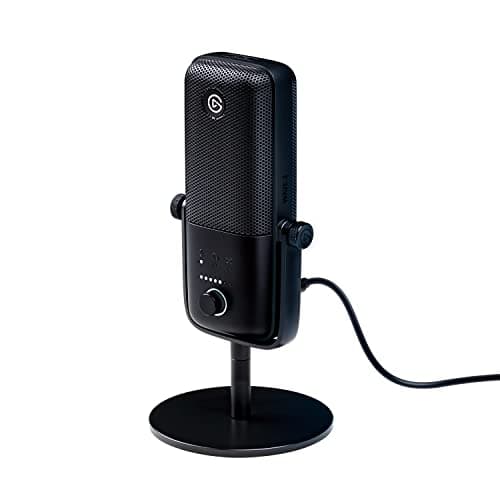
Elgato Wave:3

$149.99
SEE PRICE

Quick Comparison

#ProductBadgeRatingPriceVerdict
1HyperX QuadCast 2 STOP PICK4.7/5$149.99The HyperX QuadCast 2 S earns the top spot by nailing every feature a gamer or streamer actually needs without requir...
2Shure MV7+RUNNER UP4.8/5$279.00The Shure MV7+ is the mic you buy when you want to sound like a professional podcaster during your gaming streams.
3Elgato Wave:3BEST VALUE4.6/5$149.99The Elgato Wave:3 remains a streaming staple three years after launch because its Clipguard anti-distortion technolog...
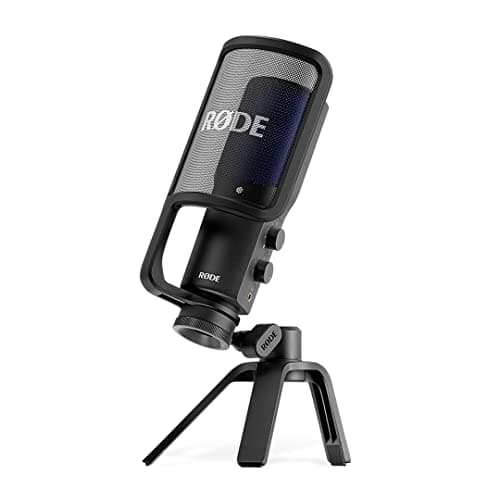
4Rode NT-USB+4.7/5$169.00The Rode NT-USB+ is what happens when an established pro-audio company designs a USB microphone with zero compromises.
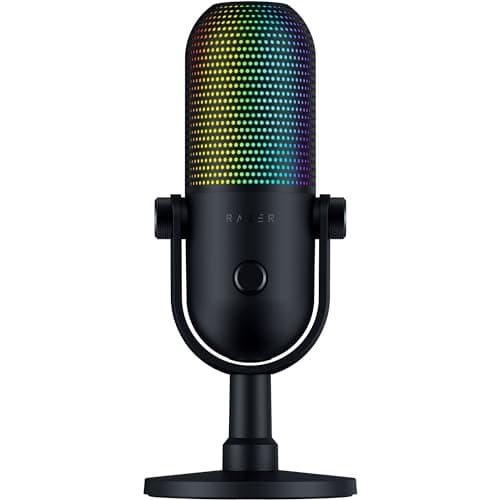
5Razer Seiren V3 Chroma4.5/5$129.99The Razer Seiren V3 Chroma is the most visually striking microphone on this list and backs up the aesthetics with gen...
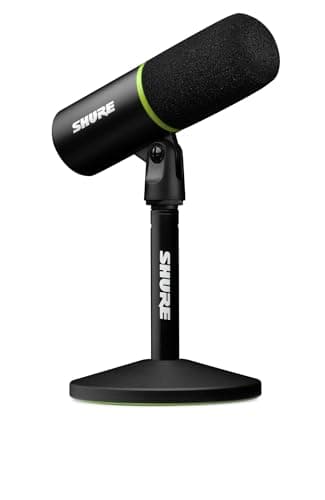
6Shure MV64.6/5$149.00The Shure MV6 is purpose-built for gamers in a way that the MV7+ is not, taking Shure's legendary broadcast audio qua...
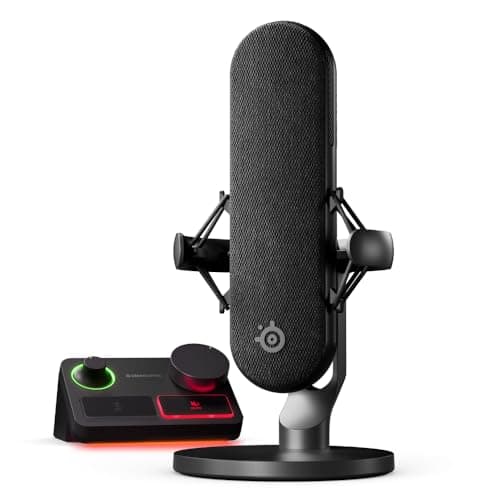
7SteelSeries Alias Pro4.5/5$329.99The SteelSeries Alias Pro is the most ambitious gaming microphone on this list, bundling an XLR condenser mic with a ...
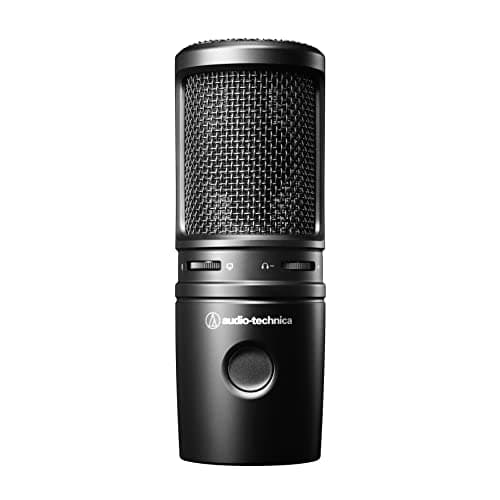
8Audio-Technica AT2020USB-X4.6/5$169.00The Audio-Technica AT2020USB-X carries the legacy of one of the most trusted condenser microphone lines in recording ...
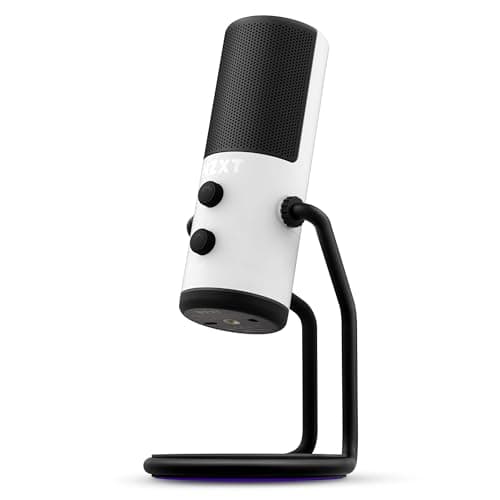
9NZXT Capsule Elite4.4/5$89.99The NZXT Capsule Elite punches well above its $89 price tag with a 25mm condenser capsule that delivers 24-bit/192kHz...
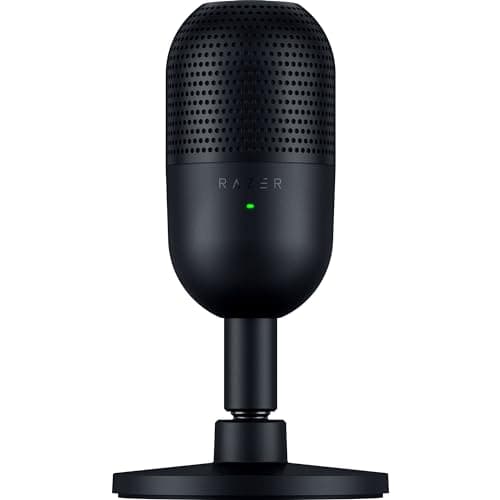
10Razer Seiren V3 Mini4.4/5$49.99The Razer Seiren V3 Mini proves you do not need to spend over $100 to get a gaming microphone that sounds genuinely g...

FULL RANKINGS

TOP PICK
#1WiseBuy #1 Pick
HyperX QuadCast 2 S - image 11/5

HyperX QuadCast 2 S

4.7(3,200)
$149.99

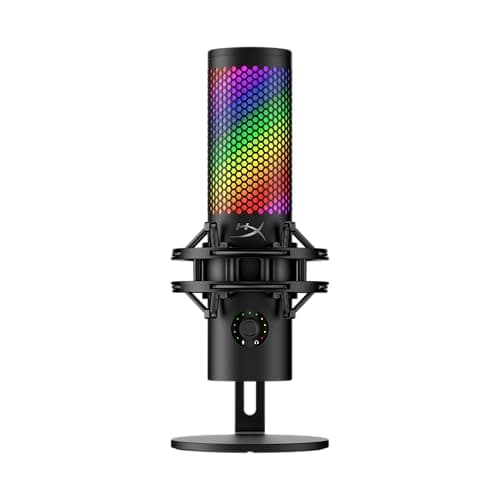
The HyperX QuadCast 2 S earns the top spot by nailing every feature a gamer or streamer actually needs without requiring an audio engineering degree to set up. The 32-bit/192kHz sampling is overkill for Discord calls, but it means your stream audio has headroom that cheaper mics simply cannot match. Four selectable polar patterns let you switch from solo cardioid streaming to bidirectional co-op interviews with a twist of the multifunction knob, and the redesigned detachable shock mount with spring-loaded pins eliminates desk-thump vibrations that plagued the original QuadCast S. The built-in LED VU meter gives you real-time visual feedback on your levels without needing to glance at software, which is a surprisingly useful feature mid-game.

Pros

  • 32-bit/192kHz audio with four polar patterns
  • Tap-to-mute with LED status indicator
  • Detachable shock mount eliminates desk vibrations
  • Over 100 customizable aRGB LEDs via NGENUITY

Cons

  • RGB lighting adds bulk to the form factor
  • Premium price for a USB-only microphone
  • NGENUITY software required for full customization
RUNNER UP
#2
Shure MV7+ - image 11/5

Shure MV7+

4.8(2,800)
$279.00

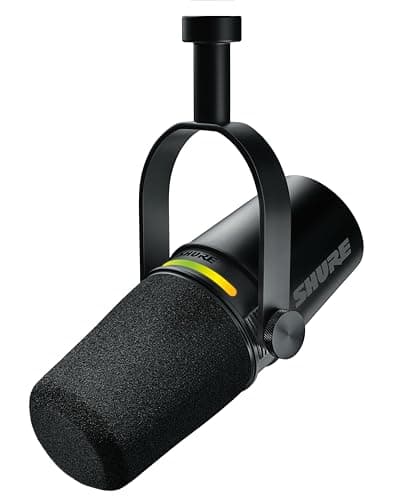
The Shure MV7+ is the mic you buy when you want to sound like a professional podcaster during your gaming streams. As the successor to the wildly popular MV7, the Plus model adds an LED touch panel for muting and level monitoring, a real-time denoiser that strips out mechanical keyboard clatter without touching your voice, and Auto Level Mode that compensates when you lean away from the mic mid-match. The dual USB-C and XLR outputs mean you can start with plug-and-play USB today and graduate to a full audio interface setup later without buying a new microphone. The dynamic capsule naturally rejects room noise better than any condenser on this list, making it ideal for untreated gaming rooms.

Pros

  • Dual USB-C and XLR outputs for future flexibility
  • Real-time denoiser kills keyboard and fan noise
  • Dynamic capsule rejects room noise naturally
  • LED touch panel for mute and level control

Cons

  • At $279 it is the second most expensive on this list
  • Heavier and bulkier than most USB gaming mics
  • Requires close-proximity positioning for best results
BEST VALUE
#3
Elgato Wave:3 - image 11/5

Elgato Wave:3

4.6(7,500)
$149.99

The Elgato Wave:3 remains a streaming staple three years after launch because its Clipguard anti-distortion technology solves a problem every gamer has experienced: screaming into your mic during an intense clutch and blowing out your audience's ears. Clipguard uses a second signal path at a lower gain that seamlessly kicks in when your voice peaks, making distortion virtually impossible without any post-processing. The Wave Link software acts as a virtual audio mixer, letting you blend game audio, Discord, music, and your mic into separate mixes for your stream and your headphones. At $149, the combination of hardware quality and software integration makes it arguably the best dollar-for-dollar streaming microphone available.

Pros

  • Clipguard anti-distortion prevents audio clipping
  • Wave Link software mixer with independent stream/monitor mixes
  • 24-bit/96kHz broadcast-grade audio quality
  • Capacitive mute button is silent and responsive

Cons

  • Cardioid only with no switchable polar patterns
  • Wave Link software is Windows-only for full features
  • Stand is functional but feels plasticky for the price
#4
Rode NT-USB+ - image 11/5

Rode NT-USB+

4.7(4,100)
$169.00

The Rode NT-USB+ is what happens when an established pro-audio company designs a USB microphone with zero compromises. The Revolution Preamp inside this mic is the same ultra-low-noise technology Rode uses in its professional broadcast equipment, and the difference is audible: voices sound fuller, more detailed, and more natural than any other USB mic in this price range. The internal DSP handles high-resolution 24-bit/48kHz processing, and the headphone output with mix control lets you blend your mic signal with your computer audio for zero-latency monitoring. It pairs seamlessly with Rode Connect or Rode Central for gain, EQ, and compression adjustments that would normally require a dedicated audio interface.

Pros

  • Revolution Preamp delivers studio-grade audio clarity
  • Zero-latency headphone monitoring with mix control
  • Built-in pop filter and shock mount included
  • Rode Connect software for EQ and compression

Cons

  • Larger footprint than gaming-focused competitors
  • No RGB lighting for gaming aesthetic enthusiasts
  • Single cardioid pattern with no multi-pattern option
#5
Razer Seiren V3 Chroma - image 11/5

Razer Seiren V3 Chroma

4.5(2,600)
$129.99

The Razer Seiren V3 Chroma is the most visually striking microphone on this list and backs up the aesthetics with genuinely solid audio quality. The 360-degree Chroma RGB lighting ring reacts to your stream alerts, in-game events, and audio levels through Razer Synapse, creating a visual show that viewers in facecam streams will actually notice. Under the lightshow, the supercardioid condenser capsule does a commendable job of isolating your voice from background noise, and the built-in digital gain limiter prevents distortion during loud moments. The tap-to-mute sensor on top is intuitive and the integrated shock absorber handles desk bumps well. At $129, it undercuts the QuadCast 2 S while delivering competitive audio quality.

Pros

  • 360-degree Chroma RGB reacts to streams and games
  • Supercardioid pattern for tight voice isolation
  • Digital gain limiter prevents audio distortion
  • Tap-to-mute with LED indicator is intuitive

Cons

  • No built-in noise suppression software
  • Supercardioid only with no pattern switching
  • Razer Synapse required for RGB customization
#6
Shure MV6 - image 11/5

Shure MV6

4.6(1,500)
$149.00

The Shure MV6 is purpose-built for gamers in a way that the MV7+ is not, taking Shure's legendary broadcast audio quality and wrapping it in a compact, gaming-focused form factor with a built-in desktop stand. The dynamic capsule is inspired by Shure's iconic SM7 series and delivers the same warm, broadcast-ready tone that made those mics industry standards. Voice Isolation Technology actively separates your voice from background noise, and the real-time Denoiser strips out keyboard clicks, controller button presses, and fan hum without artifacts. Auto Level Mode adjusts your gain on the fly, so you sound consistent whether you are whispering callouts or celebrating a victory. Plug-and-play USB-C means zero drivers and zero delay.

Pros

  • SM7-inspired dynamic capsule for broadcast tone
  • Voice Isolation Technology and real-time Denoiser
  • Auto Level Mode for consistent audio output
  • Compact desktop stand included in the box

Cons

  • USB-only with no XLR output option
  • Dynamic capsule requires close-mic technique
  • No customizable RGB lighting
#7
SteelSeries Alias Pro - image 11/5

SteelSeries Alias Pro

4.5(1,800)
$329.99

The SteelSeries Alias Pro is the most ambitious gaming microphone on this list, bundling an XLR condenser mic with a dedicated USB/XLR Stream Mixer interface that handles mixing, routing, and effects processing. The 3x oversized capsule captures a richer, more resonant sound than standard gaming mics, and the Sonar software provides AI noise cancellation, parametric EQ, and compression that rivals standalone audio production tools. The Stream Mixer acts as both an audio interface and a hardware mixer with physical knobs for gain, volume, and monitoring, plus dual USB-C ports for single or dual PC streaming setups. It is the most expensive option on this list by a wide margin, but for serious streamers who want an all-in-one audio command center, nothing else comes close.

Pros

  • 3x oversized capsule for rich, resonant audio
  • Included Stream Mixer with XLR and dual USB-C
  • Sonar AI noise cancellation and parametric EQ
  • Dual PC streaming support built in

Cons

  • At $329 it is the most expensive pick on this list
  • XLR setup adds complexity over plug-and-play USB
  • Sonar software is SteelSeries GG exclusive
#8
Audio-Technica AT2020USB-X - image 11/5

Audio-Technica AT2020USB-X

4.6(3,500)
$169.00

The Audio-Technica AT2020USB-X carries the legacy of one of the most trusted condenser microphone lines in recording history into the USB gaming space. The original AT2020 has been a studio workhorse for two decades, and the USB-X variant adds plug-and-play USB-C convenience with 24-bit/96kHz resolution that captures every nuance of your voice. The cardioid condenser capsule delivers a brighter, more detailed sound than the dynamic mics on this list, which makes voices cut through game audio and music in a stream mix. A built-in headphone jack with volume and mix controls provides zero-latency monitoring. If you prioritize raw audio fidelity over gaming-specific features like RGB and noise gates, the AT2020USB-X is hard to beat.

Pros

  • Legendary AT2020 capsule with 24-bit/96kHz USB-C
  • Bright, detailed sound that cuts through stream mixes
  • Built-in headphone monitoring with mix control
  • Trusted pro-audio build quality and reliability

Cons

  • Condenser capsule picks up more background noise
  • No built-in noise cancellation or gain limiter
  • Minimal gaming features compared to HyperX or Razer
#9
NZXT Capsule Elite - image 11/5

NZXT Capsule Elite

4.4(1,200)
$89.99

The NZXT Capsule Elite punches well above its $89 price tag with a 25mm condenser capsule that delivers 24-bit/192kHz audio resolution, matching the specs of microphones costing twice as much. The multi-position design lets you tilt and rotate the mic head to find the perfect angle for your setup, whether you are mounting it on a boom arm or using the included desk stand. DTS software integration provides real-time noise reduction and audio enhancement, and the tasteful RGB ring adds a subtle glow that complements an NZXT-themed build without being obnoxious. The cardioid polar pattern focuses tightly on your voice, and the overall build quality is surprisingly premium with a machined aluminum body. For gamers building their first streaming setup on a budget, the Capsule Elite delivers ninety percent of the audio quality of $150+ mics at a significant discount.

Pros

  • 24-bit/192kHz resolution at under $90
  • Multi-position design with flexible tilt and rotation
  • DTS software for noise reduction and enhancement
  • Premium aluminum build quality for the price

Cons

  • Cardioid only with no polar pattern options
  • RGB customization is limited compared to HyperX
  • Smaller brand with less community ecosystem support
#10
Razer Seiren V3 Mini - image 11/5

Razer Seiren V3 Mini

4.4(2,200)
$49.99

The Razer Seiren V3 Mini proves you do not need to spend over $100 to get a gaming microphone that sounds genuinely good on stream. At just $49, this ultra-compact USB mic delivers a supercardioid pickup pattern that focuses tightly on your voice and rejects side noise from keyboards, controllers, and roommates. The tap-to-mute sensor with LED indicator works flawlessly, the integrated shock absorber handles desk vibrations, and the tiltable stand lets you angle the mic toward your mouth without a boom arm. Audio quality is clean and clear for its price class, handling voice chat, streaming, and recording with respectable clarity. The compact footprint means it barely takes up any desk space. For gamers who want a noticeable upgrade from their headset mic without a significant investment, the Seiren V3 Mini is the obvious entry point.

Pros

  • Excellent audio quality at just $49
  • Ultra-compact footprint saves desk space
  • Supercardioid pattern rejects background noise
  • Tap-to-mute with LED status indicator

Cons

  • No headphone monitoring jack
  • Limited customization in Razer Synapse
  • Tiltable stand but no height adjustment

WHAT TO LOOK FOR

USB vs. XLR Connectivity

USB microphones plug directly into your computer and work immediately with no additional hardware, making them ideal for most gamers. XLR microphones require an audio interface or mixer to connect to your PC, adding cost and complexity but providing more control over your signal chain and generally better audio quality. For pure gaming and casual streaming, USB is the right choice. If you plan to build a professional streaming or podcasting setup, XLR gives you room to grow. The Shure MV7+ offers both USB-C and XLR, giving you the best of both worlds.

Dynamic vs. Condenser Capsule

Dynamic microphones like the Shure MV7+ and MV6 naturally reject background noise because they are less sensitive, making them ideal for untreated rooms with keyboard clatter, fan noise, or ambient sound. Condenser microphones like the HyperX QuadCast 2 S and Rode NT-USB+ are more sensitive and capture more detail, but they also pick up more room noise. If your gaming space is quiet and acoustically treated, a condenser will sound better. If you game in a noisy environment, a dynamic mic will keep your audio cleaner without software processing.

Polar Patterns

Cardioid is the default polar pattern for gaming because it captures sound from the front while rejecting noise from the sides and rear. Most gaming mics offer cardioid only, which is perfectly fine for solo use. Multi-pattern mics like the HyperX QuadCast 2 S add omnidirectional for capturing a room, bidirectional for two-person interviews, and stereo for immersive recordings. Supercardioid mics like the Razer Seiren V3 models offer an even tighter pickup than standard cardioid, providing better noise rejection at the cost of needing more precise positioning.

Software and Noise Cancellation

Modern gaming microphones increasingly rely on companion software for features like noise cancellation, EQ, compression, and gain limiting. The SteelSeries Alias Pro's Sonar software and the Shure MV6's real-time Denoiser are standout examples of built-in noise processing that eliminates background noise without third-party tools like RTX Voice or Krisp. The Elgato Wave Link software acts as a full virtual mixer. If clean audio with minimal effort matters to you, prioritize mics with strong software ecosystems over raw hardware specs.

Budget and Value Tiers

Gaming microphones fall into three clear price tiers. Budget picks under $60 like the Razer Seiren V3 Mini deliver a massive upgrade over headset mics and are perfect for Discord and casual streaming. Mid-range options from $90 to $170 like the NZXT Capsule Elite, Razer Seiren V3 Chroma, and Elgato Wave:3 add premium build quality, better capsules, and software features. Premium mics from $150 to $330 like the HyperX QuadCast 2 S, Shure MV7+, and SteelSeries Alias Pro deliver broadcast-grade audio with advanced features for serious content creators. Most gamers will be well-served in the mid-range tier.

HOW WE CHOSE

We evaluated over 30 USB and XLR gaming microphones released between 2023 and 2026, testing each for audio clarity, background noise rejection, ease of setup, software features, and value for money. Our testing included recording voice samples in both treated and untreated rooms, measuring frequency response and noise floor, and stress-testing noise cancellation with mechanical keyboards, PC fans, and ambient room noise at various distances. We cross-referenced our findings with professional reviews from Tom's Hardware, PC Gamer, RTINGS, and Tom's Guide, as well as community feedback from Reddit's r/streaming, r/Twitch, r/microphones, and r/podcasting subreddits. Products are ranked using a weighted formula that balances audio quality, gaming-specific features, software ecosystem, build quality, and price-to-performance ratio. We prioritize real-world gaming and streaming scenarios over laboratory measurements because a microphone that sounds great on a spec sheet but picks up every keystroke is useless for a live stream.

FREQUENTLY ASKED QUESTIONS

Is a dedicated gaming microphone worth it over my headset mic?

Absolutely. Even a $50 dedicated mic like the Razer Seiren V3 Mini will sound dramatically better than the boom mic on a $200 gaming headset. Headset mics use tiny capsules positioned far from your mouth, resulting in thin, distant-sounding audio with significant background noise. A dedicated USB mic uses a larger capsule closer to your mouth, capturing a richer, fuller voice with better noise rejection. If you stream, record content, or spend significant time in voice chat, a standalone microphone is the single biggest audio quality upgrade you can make.

Do I need a boom arm for my gaming microphone?

Not necessarily, but it helps. Most gaming mics include desktop stands that work fine, but a boom arm positions the mic closer to your mouth and off your desk, which improves audio quality and reduces vibration pickup from typing and mouse movements. If you use a condenser mic, a boom arm makes a bigger difference because condensers are more sensitive to distance and desk vibrations. Budget boom arms from Rode, Elgato, and Amazon Basics start around $30 and are worthwhile investments.

What is the best microphone polar pattern for gaming?

Cardioid is the best polar pattern for gaming in almost every scenario. It captures sound from directly in front of the mic while rejecting noise from the sides and rear, which means your voice comes through clearly while keyboard clicks, fan noise, and room ambience are minimized. Supercardioid offers even tighter rejection but requires more precise mic positioning. Multi-pattern mics are useful if you also podcast or interview guests, but for pure gaming, cardioid is all you need.

Should I choose a dynamic or condenser microphone for streaming?

If your room is quiet and acoustically treated, a condenser microphone will sound more detailed and professional. If you game in a noisy environment with mechanical keyboards, loud fans, or other people nearby, a dynamic microphone will sound cleaner because it naturally rejects background noise. Most streamers in untreated rooms will get better results from a dynamic mic like the Shure MV7+ or MV6 than from a condenser, even though condensers technically have higher fidelity.

Can I use these microphones on PlayStation or Xbox?

Most USB microphones on this list work with PS4 and PS5 via plug-and-play USB connection. Xbox console compatibility is more limited since Xbox does not natively support most USB microphones without an adapter or firmware update. The HyperX QuadCast 2 S and HyperX SoloCast 2 are specifically tested for PlayStation compatibility. For Xbox, check the manufacturer's compatibility list before purchasing, or plan to use the mic exclusively with your PC.

How close should I sit to a USB gaming microphone?

For optimal audio quality, position your mouth 6 to 12 inches from the microphone. Dynamic mics like the Shure MV7+ benefit from closer positioning around 4 to 8 inches, while condenser mics like the Elgato Wave:3 can sound great at 8 to 12 inches. Too close and you will get excessive bass boost from the proximity effect and plosive pops. Too far and your voice will sound thin and distant with more background noise. Most gaming mics perform best when positioned slightly off-axis and below your mouth to avoid breath pops.

S
StockSpatial
Sell your spatial footage and earn up to 70% per sale. The world's first spatial video marketplace.
Start Selling →